Project Case Study
What Remains of Us
A hypermedia-inspired narrative game where players piece together a plane crash story through object exploration.
The Concept


Zoë Artner created a hauntingly atmospheric illustration of an airplane crash site in a snowy mountain landscape. Rather than telling the story directly, she wanted players to piece together what happened through environmental storytelling -- discovering objects scattered across the scene, each with its own description that hints at the tragedy that unfolded.
This approach draws inspiration from games like Dark Souls, where item descriptions serve as fragments of lore. By examining a shattered watch, an empty first aid kit, or a worn diary, players gradually reconstruct the narrative of the crash survivors.

The Engine: Hypermedia Principles in Practice
Instead of reaching for a heavy game framework, we built a lightweight "game engine" inspired by hypermedia principles. The core idea comes from Hypermedia Systems and the legacy of HyperCard: content should be navigable through direct interaction, with the structure defined declaratively rather than imperatively.
The entire game state lives in a single story.json file. Change the images, rewrite the descriptions, adjust the hotspots -- and you have an entirely different game. No code changes required.
Architecture Overview
The system consists of four files:
index.html    -- Structure and video sequence
main.js       -- Scene rendering and interaction logic
story.json    -- All content: scenes, objects, navigation, hotspots
style.css     -- Visual presentation
Defining Scenes in JSON
Each scene in story.json contains:
- id -- A unique identifier
- background -- The illustration file to display
- navigation -- Which scenes connect in each direction (top, right, bottom, left)
- hotspots -- Clickable regions that either navigate or show objects
- objects -- Items with images and descriptions
Here's a simplified example:
{
  "id": "crash_site",
  "name": "Crash Site",
  "background": "crash_site.webp",
  "navigation": {
    "left": "environment",
    "right": "graveyard",
    "top": "overview"
  },
  "hotspots": [
    {
      "id": "plane",
      "coords": "789,185,920,135,1094,154...",
      "action": "navigate",
      "target": "inside_planewreck"
    },
    {
      "id": "campfire",
      "coords": "836,786,856,825,870,875...",
      "action": "object",
      "target": "campfire"
    }
  ],
  "objects": [
    {
      "id": "campfire",
      "image": "campfire.png",
      "description": "A circle of stones surrounds a heap of damp branches. It seems they tried to start a fire for warmth, but the snow-soaked wood refused to ignite."
    }
  ]
}

Image Maps: Old-School Tech, Modern Application
For clickable regions, we used the classic HTML image map approach -- polygon coordinates that define irregular shapes over the artwork. The tool image-map.net makes creating these coordinates straightforward: upload an image, draw polygons around interactive areas, and export the coordinate strings.
Rather than using native <map> and <area> elements (which don't scale well with responsive images), we render the hotspots as SVG polygons overlaid on the scene:
Scene rendering + hotspot overlay:
function loadScene(scene) {
  // Set background image for the scene
  sceneContainer.style.backgroundImage = `url('images/backgrounds/${scene.background}')`;

  // Create SVG overlay that matches the original art size
  const svg = document.createElementNS(svgNS, 'svg');
  svg.setAttribute('viewBox', '0 0 2000 1125');

  scene.hotspots.forEach(hotspot => {
    const polygon = document.createElementNS(svgNS, 'polygon');
    polygon.setAttribute('points', hotspot.coords);
    polygon.style.fill = 'transparent';
    polygon.style.cursor = 'pointer';

    polygon.addEventListener('click', () => {
      // Action can be navigation or object inspection
      if (hotspot.action === 'navigate') {
        loadScene(findSceneById(hotspot.target));
      } else if (hotspot.action === 'object') {
        displayObject(currentScene.objects.find(obj => obj.id === hotspot.target));
      }
    });

    svg.appendChild(polygon);
  });
}
The viewBox matches the original illustration dimensions (2000x1125), so coordinates work regardless of screen size. The SVG scales with the container, and the polygons remain correctly positioned.
Navigation System
Movement between scenes uses a four-direction system. Hover zones at the screen edges reveal arrow buttons when navigation is available in that direction:
Navigation UI:
<div class="navigation">
<div class="right_zone"><button class="right">→</button></div>
<div class="left_zone"><button class="left">←</button></div>
<div class="top_zone"><button class="top">↑</button></div>
<div class="bottom_zone"><button class="bottom">↓</button></div>
</div>
The CSS hides buttons by default, sliding them into view on hover. The JavaScript shows or hides each button based on whether the current scene has a connection in that direction:
Navigation logic:
['top', 'right', 'bottom', 'left'].forEach(dir => {
  const btn = document.querySelector(`.${dir}`);
  // Only show arrows that have a valid target
  btn.style.display = (scene.navigation && scene.navigation[dir]) ? 'block' : 'none';
});
Object Overlays
When a player clicks an object hotspot, an overlay appears showing the item's image and description. The overlay uses a semi-transparent dark background to focus attention on the object:
Object overlay styling:
.object {
  position: absolute;
  width: 100%;
  height: 100%;
  background-color: rgba(0, 0, 0, 0.7);
  display: flex;
  align-items: center;
  justify-content: center;
  opacity: 0;
  transition: 0.3s;
}

.object.visible {
  opacity: 1;
  pointer-events: auto;
}
Clicking anywhere on the overlay (outside the content) dismisses it, returning the player to exploration.
Narrative Through Objects
The power of this approach lies in how descriptions build atmosphere and story. Compare these two objects:
A stuffed toy:
"A small stuffed animal, frozen stiff, its missing button eye staring blankly. It must have belonged to a child. I don't want to imagine what happened to them."
A voice recorder:
"This is Hannah Giddings. I'm a journalist with The New York Times... I found the ring. Hidden in your socks. God, you idiot. I was going to say something when I got back..."
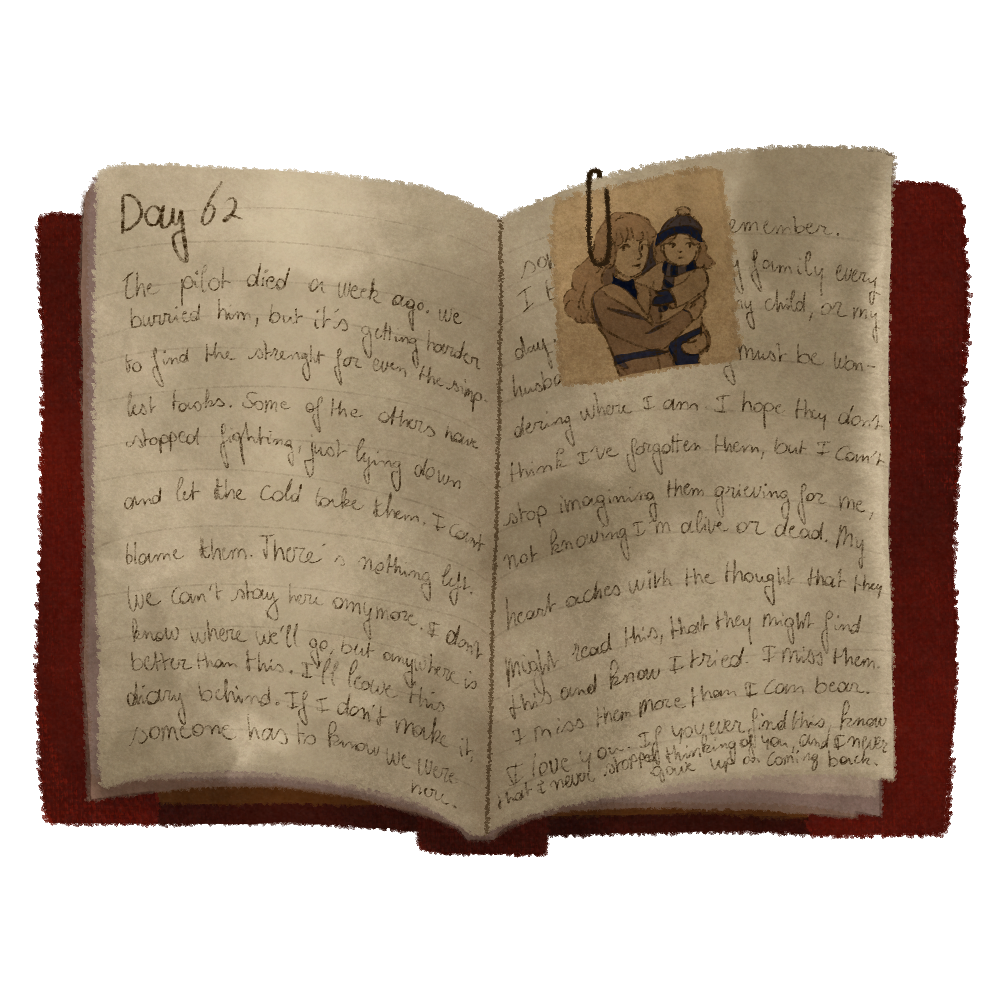
Some objects, like the diary, contain extended text -- multiple dated entries that reveal the full arc of the survivors' ordeal. The engine handles this by detecting specific object IDs and rendering formatted HTML instead of plain text descriptions.
Audio Integration
Sound design plays a crucial role in the atmosphere. The engine manages multiple audio elements:
- Background ambience -- Loops continuously during exploration
- Footstep sounds -- Play on navigation between scenes
- Object-specific audio -- The voice recorder triggers a recorded message when examined
- Video sequences -- Intro cinematics with their own sound
if (object.id === "recorder") {
  // Restart and play audio tied to this object
  recorderAudio.currentTime = 0;
  recorderAudio.play();
}

Working Method
We used a repeatable loop that keeps content decisions in the foreground:
- Illustrate the scene with a clear visual hierarchy and space for interactive regions.
- Define objects and hotspots in
story.jsonso narrative beats stay decoupled from the engine. - Generate polygon coordinates with image-map.net and test alignment in-browser.
- Playtest and refine the pacing by adjusting object text, audio cues, and navigation paths.
Making It Your Own
The beauty of this data-driven approach is its adaptability. To create a completely different experience:
- Replace the background images in
/images/backgrounds/ - Create new object images in
/images/objects/ - Edit
story.jsonto define your scenes, connections, hotspots, and descriptions - Use image-map.net to generate polygon coordinates for your hotspots
The engine code itself rarely needs modification. Whether you're building a mystery in a Victorian mansion, an exploration of an abandoned space station, or a documentary experience through historical photographs -- the same structure applies.
Technical Notes
Image formats: We use .webp for backgrounds (good compression, wide support) and .png for objects (transparency support).
Coordinate system: All hotspot coordinates are based on a 2000x1125 canvas. When creating coordinates with image-map.net, ensure your source image matches these dimensions, or scale the coordinates proportionally.
Performance: The engine preloads all background and object images on startup to ensure smooth transitions:
function preloadImages(story) {
  for (const scene of story.scenes) {
    // Preload each background
    preloadImage(`images/backgrounds/${scene.background}`);
    if (scene.objects) {
      for (const object of scene.objects) {
        // Preload each object image
        preloadImage(`images/objects/${object.image}`);
      }
    }
  }
}
Mobile considerations: The hover-based navigation works well with mouse input. For touch devices, the navigation zones respond to taps. Object hotspots work naturally with touch since they respond to click events.
Outcome and Takeaways
- A lightweight, reusable engine where content changes live entirely in JSON.
- A navigable scene structure that keeps narrative discovery player-driven.
- An interaction model that scales from desktop to touch devices without extra tooling.
Conclusion
What Remains of Us demonstrates how a simple, declarative approach to game development can produce atmospheric, narrative-rich experiences. By separating content from code -- keeping all scenes, objects, and connections in a JSON file -- we created an engine that's both easy to understand and adaptable.
Zoë's evocative illustrations and carefully crafted item descriptions work together to create an experience where players become investigators, piecing together tragedy from the remnants left behind. The technology stays invisible, letting the story speak through the objects that remain.
This project was developed with coaching support from Code Space. The student conceived the concept and created all visual assets; Code Space provided technical guidance on implementation.